Clean and clear playback.

Anytime, anywhere with Internet access, you can listen to your phone 24 hours in real time. It is played with clear sound and without any interruptions.

Broadcasting station program display

We show the program in progress at the broadcasting station in real time. The broadcast time is also displayed.

Song selection display

We show songs from a broadcasting station. It even has a memory for you so you do not forget the songs you heard.

Auto-shutdown setting

Try the auto-shutdown time setting.

50,000+ Channels
Real-Time Radio Stations

No matter where you are in the world, if you have the Internet, you can listen to radio all over the world.

Clear sound quality

Want to hear clean, vivid and clear sound quality? Do it right now.

Bluetooth support

Do you have a Bluetooth-enabled speaker or earphone? Try using it by connecting via Bluetooth.

Automatic connection of earphones and headphones

Are you listening with earphones or headphones? When the earphone or headphones are connected, the sound is automatically transmitted to the earphone.

simple design

No more complicated screens!!! It consists of an intuitive screen design.

Favorites

Are you worried about which station to choose? You can add frequently listened stations to your favorites.

All Android phones

It can run on most smartphones with Android.

Enhancements

New enhancements have been made.

RadioTalk

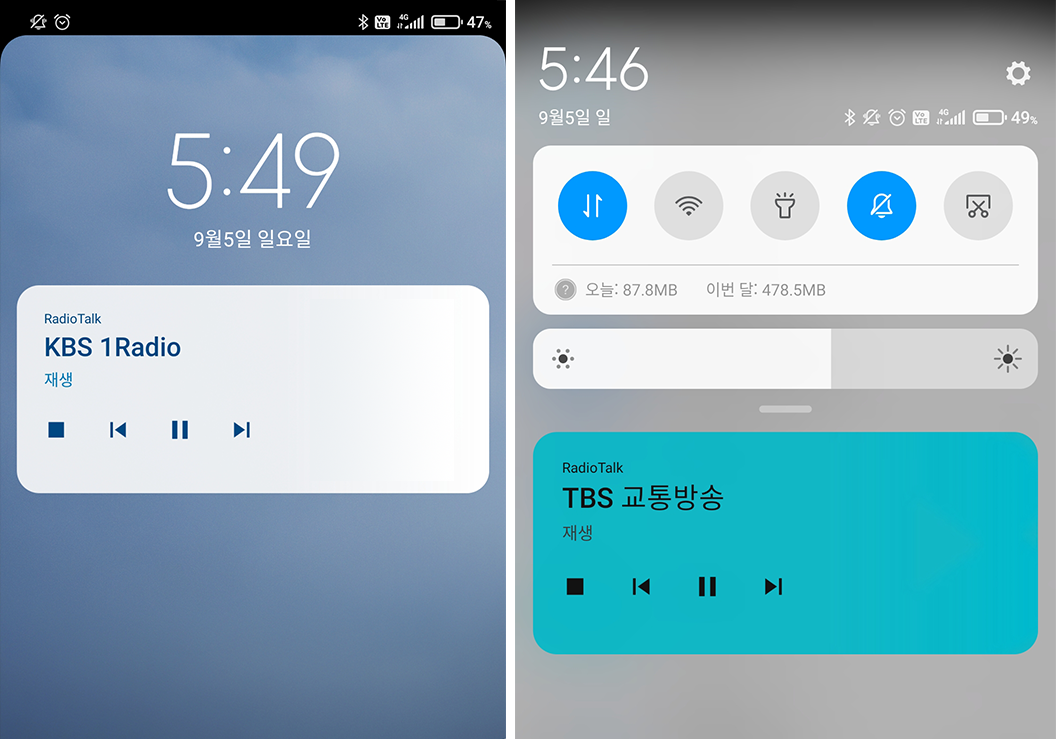
Replay when the screen is locked

There is no need to enter your phone again after leaving Play Radio Talk.
Even when the screen is locked, broadcasting stations can be played and paused
dashboard

More awesome features.

Experience various functions.

Station History

I don't know which station I heard. I don't remember the broadcasting station. You can keep remembering the list you heard once and then listen to it again.

Temporary pause

When you answer the phone, the radio stops. It will be broadcast again when the call is over.

Auto-shutdown setting

Try the auto-shutdown time setting.

Wi-Fi connection

When connected to Wi-Fi, data is not used. Therefore Saving your data.

Additional Features

A more comfortable additional function is included.

RadioTalk

Song selection display

We show songs from a broadcasting station. It even has a memory for you so you do not forget the songs you heard.

RadioTalk

Easy classification

There are too many broadcasting stations? It's designed to be easy to find, so try it.

RadioTalk

Search

You want to find the broadcasting station but you're confused? It's easy to search.

RadioTalk

Add to Home Screen

If you have a broadcasting station that you listen to often, you can take it out on the home screen.

How We Build RadioTalk

We keep refining the listening experience and playback quality so radio feels comfortable every day.

Listening Experience

We design RadioTalk so you can quickly find the right station for the moment you want to listen.

Reliable Playback

We improve playback quality so streams around the world sound clearer and stay connected longer.

Global Station Data

We keep tuning station data so your radio starts smoothly and feels natural whenever you press play.

Special Thanks

Thank you to the listeners who helped shape the RadioTalk experience.

"The sound quality is excellent, and the menu feels complete. It is amazing to listen to radio from around the world. I recommend it to anyone looking for a simple radio app with clear sound."
image
Min Chil-hong
Radio Supporter
"When a good pop song comes on, I can check the song information right away. That makes listening much easier, and the sound quality is great."
image
Ryu In-sook
Translator
"After trying several radio apps, I have been using only this one for months. There are so many stations, including international broadcasts, and the sound quality really surprised me."
image
Yeon
Music Reviewer
"RadioTalk makes my mornings feel lighter. I like finding a station that fits the mood of the day."
image
Emily Carter
Radio Listener
"The sound is clear, and song information is easy to check. It has become my go-to radio app."
image
Michael Brooks
Music Lover
"I often use it at night when I want something calm. The sleep timer makes it easy to relax."
image
Sarah Mitchell
Night Radio Listener

Installing

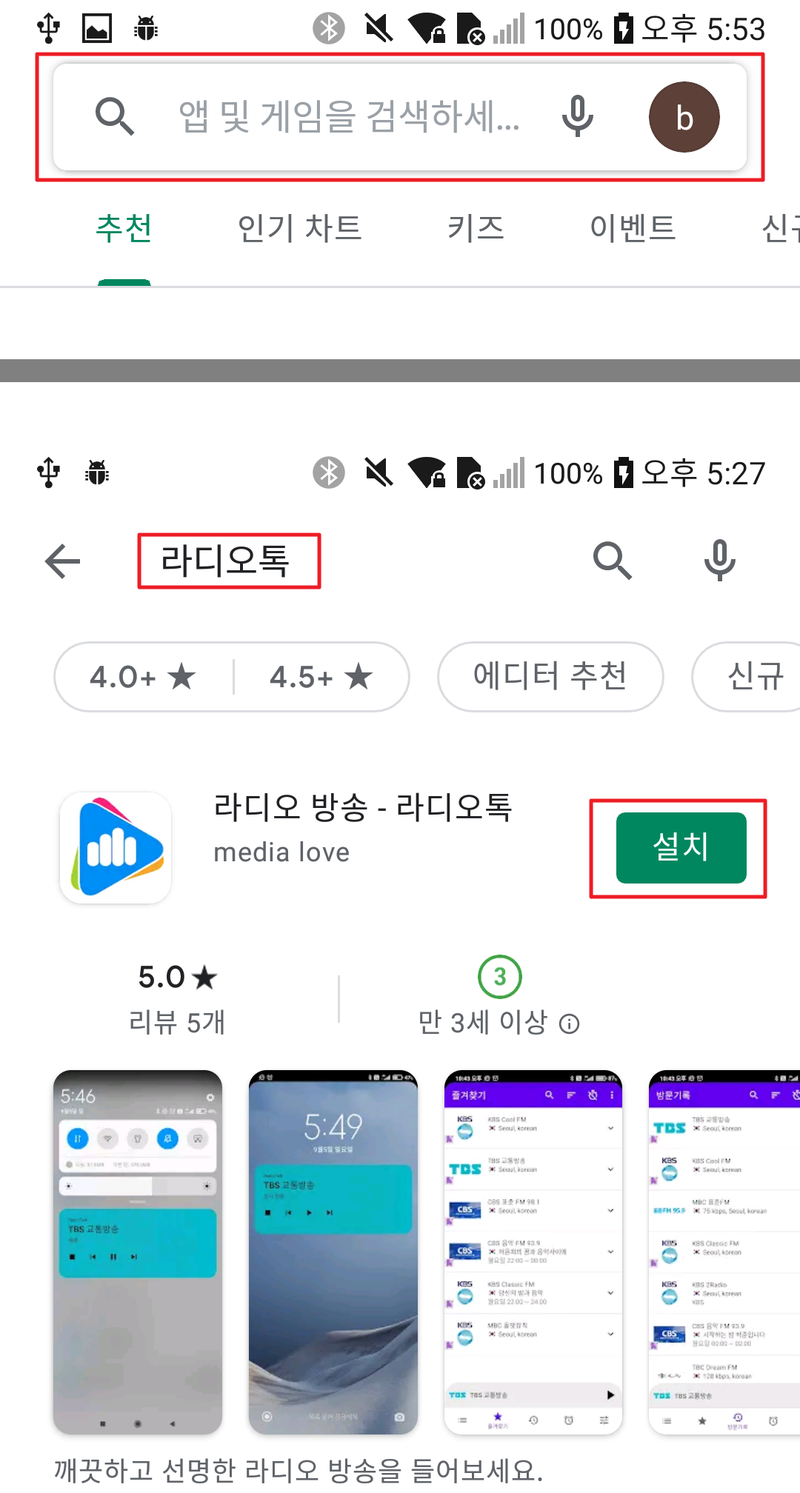
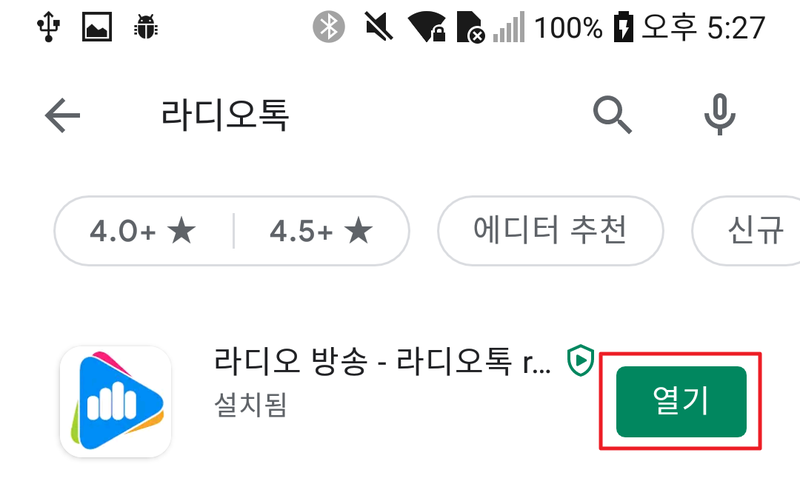
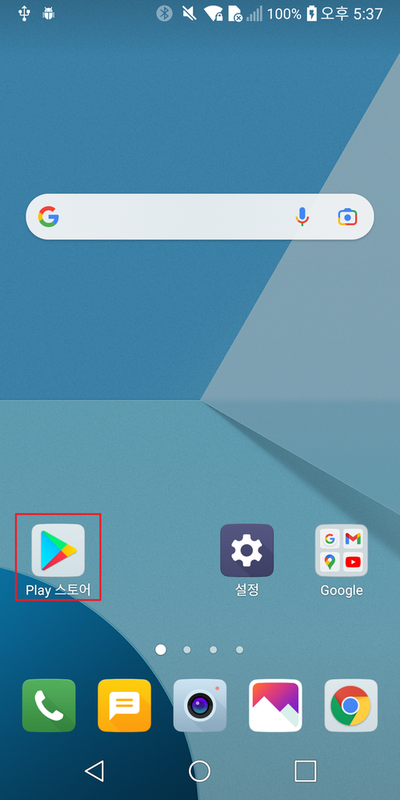
You can go to the Google Play Store and search for and install "RadioTalk". You can install it in the following order.

  • 1. Move Play Store
  • Please press "Play Store" on your smartphone.
  • Installing
  • 2. Install RadioTalk
  • Search "RadioTalk" in the search bar.
  • Click Install.
  • Installing
  • 3. Running Radio Talk
  • When the installation is complete, press Open.
  • The RadioTalk is executed.
  • Installing

Contact Us

Looking forward to various opinions.

Send us mail

Feel free to send an email to medialove21@gmail.com.

© 2023 RadioTalk
privacy